

 Tolulope Michael
How to Protect Your System from File Infector Virus (2026)
A file infector virus is a type of malicious software that attaches itself to executable files, turning them into harmful programs. These viruses can quickly spread across a system, infecting other files, programs, and even entire networks. What makes file infector viruses particularly dangerous is their ability to replicate themselves and overwrite important system files.
The process begins when an infected file is downloaded or transferred to a system. Once opened or executed, the virus embeds its code into the executable file, which is then run every time that file is opened. As the virus continues to spread, it targets other files on the system, gradually causing more damage and rendering the device unreliable or even unusable.
File infector viruses are especially harmful because they can remain undetected while silently damaging a system. Their replication method involves injecting malicious code into other executable files (.exe, .com), which allows them to spread quickly across a network. This silent propagation makes them difficult to spot, as the files they infect may seem like regular, non-infected programs.
How the Virus Works
Once inside the system, the file infector virus performs several functions to ensure its survival and spread:
- Replication: It copies itself to other executable files, embedding its code into the target files.
- Infection: It alters or corrupts the infected files, which leads to system instability and crashes.
- Stealth: The virus avoids detection by modifying the system’s behavior, making it difficult for traditional antivirus software to identify.

How Does Malware Work?
Malware, short for malicious software, refers to any program designed to harm, exploit, or otherwise compromise a computer system. When it comes to file infector viruses, the malware works by attaching itself to an executable file and using that file to replicate and spread. But how exactly does it work once it’s inside the system?
Once a file infector virus infects a system, it starts its malicious actions by executing its payload. The payload is the part of the virus that carries out its intended harmful effect. For file infector viruses, the payload often involves the following key actions:
- Self-Replication: The virus starts by making copies of itself and spreading them to other files. This replication process can occur rapidly, especially if the virus is operating on a large network of interconnected devices.
- File Corruption: The file infector virus doesn’t just replicate, it also damages the files it infects. It may overwrite important data, render files unusable, or cause system crashes, leading to data loss and decreased performance.
- Payload Execution: The virus can execute additional commands, such as launching other malware attacks, opening backdoors for hackers, or spreading across networks to other systems. This makes the file infector virus a gateway for other malicious attacks, including ransomware or Trojans.
- Evading Detection: Many file infector viruses employ advanced techniques to evade antivirus software. For example, they might use polymorphism, a technique where the virus changes its code each time it infects a new file, making it harder to detect by signature-based antivirus programs.
At the heart of how malware works is the ability to replicate, corrupt, and spread. This makes file infector viruses highly effective at compromising systems, often leading to widespread damage before the user even realizes the infection is occurring.
The Lifecycle of a File Infector Virus
The lifecycle of a file infector virus typically follows these stages:
- Infection: The virus first gains entry into the system, often through infected email attachments, malicious websites, or compromised software downloads.
- Replication and Spread: Once inside, the virus attaches itself to executable files and begins to spread across the system.
- Payload Execution: The virus triggers its payload, which may involve file corruption, system instability, or further malicious actions.
- Persistence: Many file infector viruses are designed to stay hidden and continue their damage over time, making them harder to detect and remove.
Understanding how malware works is crucial for preventing and responding to attacks. The more you know about the actions malware takes on your system, the better equipped you are to defend against it.
RELATED: How Computer Virus Prevention Works in 2026
How Do Computers Get Viruses?
Computers can become infected with viruses through various methods, making them vulnerable to attacks from malicious software like file infector viruses. These viruses can spread through several common vectors, each posing a unique risk to users and organizations. Understanding how computers get viruses is crucial to preventing infections and protecting your system from malware.
Common Ways Computers Get Infected
- Email Attachments and Phishing Links:
One of the most common ways computers get viruses is through malicious email attachments or phishing links. When a user opens an infected attachment or clicks on a malicious link, the file infector virus is downloaded and executed on the system.
- Example: A phishing email disguised as a legitimate document might prompt a user to download an infected file. Once opened, the file infector virus attaches itself to the system’s executable files, spreading further.
- Downloading Infected Files:
File infector viruses often come in the form of downloads from suspicious websites or compromised software. If users download files from untrustworthy sources, there’s a high risk of malware being downloaded onto their systems.
- Example: Downloading pirated software or free applications from unverified sources can result in file infector virus downloads, which silently infect the system upon installation.
- Removable Media (USB Drives, External Hard Drives):
Removable media is another major carrier of malware. A file infector virus can spread from one computer to another via USB drives or external hard drives, especially when these devices are shared across multiple machines. Once an infected drive is plugged into a system, the virus can spread rapidly.
- Example: If an infected USB drive is plugged into a clean system, the file infector virus might automatically execute itself and begin corrupting files on the host system.
- Example: If an infected USB drive is plugged into a clean system, the file infector virus might automatically execute itself and begin corrupting files on the host system.
- Infected Websites (Malvertising):
Malware attacks can also happen through malicious websites or ads, also known as malvertising. These websites may automatically download infected files onto a user’s device without their knowledge, often through pop-ups or redirect ads. When the user visits these sites, the file infector virus executes in the background.
- Example: Clicking on a seemingly harmless advertisement on a website could trigger the download of a file infector virus disguised as an innocuous file.
- BYOD (Bring Your Own Device) Policies:
In corporate environments, employees who use personal devices (laptops, smartphones, etc.) to access company networks can introduce viruses into the system. These infected devices may contain file infector viruses, which spread once connected to the network or shared storage.
- Example: An employee plugs in their personal device, which has a file infector virus, into the company’s internal network. The virus then spreads to the shared drives and infects the entire company system.
How to Minimize the Risk of Infection
To minimize the risk of a file infector virus, users should adopt safe browsing habits and implement security measures, such as:
- Installing antivirus software to detect and block malicious files.
- Avoiding downloading files from unknown or untrusted sources.
- Regularly updating software and security patches to close vulnerabilities that malware could exploit.
- Educating users on phishing schemes and how to recognize malicious links in emails.
Types of Viruses in Computers
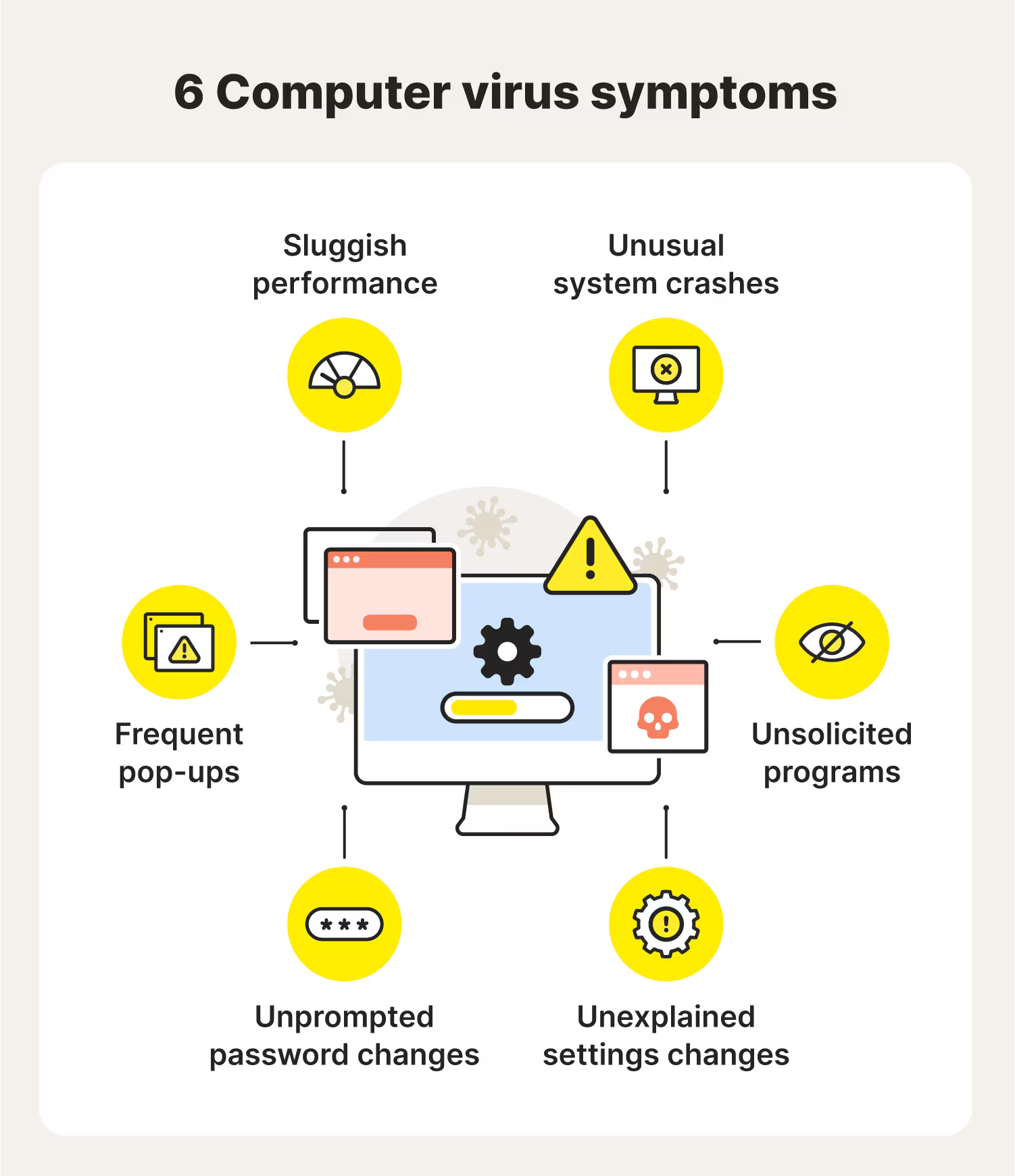
File infector viruses are just one type of malware that can compromise a computer system. In fact, there are many types of viruses in computers, each with its own unique characteristics and methods of attack. Understanding these different types is critical for protecting your system and recognizing potential threats.
1. File Infector Virus
- File infector viruses attach themselves to executable files (.exe, .com, .dll) and spread to other files when executed. Once a system is infected, the virus rapidly replicates and can cause damage, including file corruption and system instability.
- Example: A file infector virus like Win32.Sality can overwrite files and damage the operating system, rendering it unusable.
2. Macro Virus
- A macro virus infects the macros in software applications like Microsoft Word, Excel, or Access. These viruses use the macro programming language to spread and perform malicious actions, such as corrupting files or sending out spam emails.
- Example: The Concept Virus (1995) is one of the most well-known macro viruses. It spread through infected Word documents and caused widespread issues until macro security features were introduced in office software.
3. Boot Sector Virus
- A boot sector virus targets the boot sector of a computer’s hard drive, which contains the code needed to boot the operating system. This type of virus is particularly dangerous because it can infect the system before the operating system even loads, making it difficult to detect or remove.
- Example: The Stone Virus (1995) was a boot sector virus that could infect floppy disks and propagate when the disk was used in another computer.
4. Multipartite Virus
- A multipartite virus is a hybrid virus that can attack in multiple ways. It can infect a system through both the boot sector and executable files, making it harder to detect and remove. This virus often uses a combination of methods to propagate and cause damage.
- Example: Invader is a well-known multipartite virus that attacked both the boot sector and executable files, making it particularly difficult to eradicate.
5. Trojan Virus
- Trojans, or Trojan horses, disguise themselves as legitimate programs or files but contain malicious payloads. Unlike other types of viruses, Trojans don’t self-replicate but can be just as dangerous, often allowing hackers to gain unauthorized access to a system.
- Example: The Zeus Trojan is a notorious Trojan virus used for stealing sensitive financial data from infected systems.
6. Worms
- A worm is a self-replicating piece of malware that spreads across a network without needing to attach itself to files. Worms can cause significant damage by consuming network bandwidth, installing other malware, and exploiting vulnerabilities in software.
- Example: The ILOVEYOU worm (2000) is one of the most famous worms in history, causing billions of dollars in damage by spreading through email systems.
7. Ransomware
- Ransomware is a type of malware that locks users out of their own files or systems, demanding payment (usually in cryptocurrency) to unlock them. While file infector viruses are designed to corrupt files, ransomware targets users’ ability to access them.
- Example: The WannaCry ransomware (2017) affected hundreds of thousands of computers globally by exploiting vulnerabilities in Windows systems.
8. Adware and Spyware
- Adware displays unwanted ads on your system, while spyware secretly monitors your actions, collecting sensitive data such as passwords or credit card details. While not as destructive as file infector viruses, both can be highly intrusive and harmful to privacy.
- Example: The CoolWebSearch spyware was notorious for hijacking browsers and redirecting search results to malicious sites.
READ MORE: Endpoint Antivirus vs Endpoint Security: Key Updates in 2025
File Infector Virus: Real-Life Examples
While file infector viruses may seem like an old threat, they continue to cause significant damage and disruption. These viruses are particularly dangerous because they target executable files, spreading quickly and often undetected. Below are some real-life examples of file infector viruses that have had major impacts on both individuals and businesses.
1. Win32.Sality
- Win32.Sality is a file infector virus that has been active for over a decade. It infects executable files on Windows systems and spreads through local networks. Once the virus infects a system, it disables antivirus software, making it difficult for users to detect and remove the malware. In addition to its file infector virus capabilities, Win32.Sality can download additional malicious software, turning an infected machine into a bot in a botnet. The virus can also overwrite executable files, causing system crashes and data loss.
- Impact: Once a device is infected, it can cause severe operational disruption, especially in corporate environments where file infector viruses can rapidly spread across networks.
2. CIH (Chernobyl Virus)
- The CIH virus, also known as the Chernobyl Virus, was a devastating file infector virus released in 1998. It was designed to infect executable files, particularly on Windows 95/98 systems. CIH not only replicated itself across a system but also caused significant damage by overwriting critical system files. In its most severe form, it was programmed to overwrite the BIOS, rendering the computer unbootable and potentially requiring hardware replacement.
- Impact: CIH is a famous example of how a file infector virus can cause both system corruption and hardware damage, with long-term consequences for affected machines.
3. Sality
- Sality is another prominent file infector virus that targets Windows machines. Similar to Win32.Sality, it infects executable files and spreads across a network. Sality has evolved over the years, using more advanced techniques to evade detection, including polymorphism (changing its code with each infection). The virus can disable security software, making it easier to infect other machines. It is often used as a delivery mechanism for other types of malware, including ransomware.
- Impact: Sality has been responsible for widespread infections, and its ability to bypass traditional antivirus defenses makes it particularly dangerous. It can also cause major system instability and data loss.
4. Invader Virus
- The Invader virus is a multipartite virus, meaning it can attack multiple parts of a system simultaneously. This file infector virus not only targets executable files but also the boot sector, making it more resilient and harder to remove. Invader spreads rapidly across networks, infecting multiple systems at once.
- Impact: Due to its ability to target both executable files and the boot sector, Invader can cause major system failures and is particularly dangerous for enterprise networks where security measures may be lax.
Preventing and Removing a File Infector Virus
File infector viruses are particularly dangerous because they can spread quickly and cause significant damage to your files, programs, and system. The good news is that with the right precautions and actions, you can prevent and remove these harmful viruses before they cause widespread damage. Here’s a guide on how to protect your system.
1. Prevention: How to Protect Your Device from File Infector Viruses
Preventing a file infector virus from attacking your system starts with being cautious and using protective measures.
- Install and Update Antivirus Software:
A reliable antivirus program is your first line of defense against malware. Ensure your antivirus software is up to date and regularly scans your system for potential threats, including file infector viruses.
- Tip: Opt for antivirus programs with real-time protection, which can block viruses before they infiltrate your system.
- Avoid Suspicious Downloads and Links:
Be cautious about downloading files from untrusted sources or clicking on suspicious links in emails, social media, or websites. Many file infector viruses are spread via malicious email attachments or infected downloads.
- Tip: Always check the source before downloading software or opening attachments, especially if the email seems suspicious or the link looks strange.
- Use Secure Networks:
When accessing the internet, always use a secure, private network instead of public Wi-Fi. Public networks are often unprotected, making it easier for a file infector virus to spread if you’re not careful.
- Tip: Use a VPN when connecting to public Wi-Fi to add an extra layer of protection against malware attacks.
- Enable Software Firewalls:
Firewalls help block unauthorized access to your system, making it harder for malware to infiltrate. Ensure your firewall is turned on and properly configured to block suspicious traffic.
- Regularly Update Software:
Always install security patches and software updates as soon as they’re available. Many file infector viruses exploit security vulnerabilities in outdated software to gain access to a system. Keeping your operating system, browser, and applications updated ensures they are protected against the latest threats.
2. Detection: How to Spot a File Infector Virus
Detecting a file infector virus early can help prevent more serious damage. Here are the signs that may indicate an infection:
- System Slowdowns:
If your computer suddenly starts running slower than usual, it could be infected with a file infector virus. The virus may be using your system’s resources to replicate itself or perform other malicious actions.
- Unexpected File Behavior:
Watch for files that change or disappear, which could indicate that a virus is overwriting or corrupting files. File infector viruses can cause damage by corrupting important system files, making it difficult for programs to run correctly.
- Unusual Network Activity:
If your network connection becomes unusually slow or if you notice strange network activity, this could be a sign that a file infector virus is spreading across your network. The virus may be attempting to send data back to a remote attacker or infect other devices.
3. Removal: How to Remove a File Infector Virus from Your System
If your system has been infected by a file infector virus, prompt action is necessary to remove it and prevent further damage.
- Run a Full System Scan with Antivirus Software:
The first step is to run a full system scan using your antivirus software. Make sure the software is fully updated to detect the latest virus definitions.
- Tip: Use safe mode if necessary to ensure the antivirus can access and remove the virus before it starts replicating.
- Manually Remove Infected Files:
If the antivirus software detects but cannot remove the file infector virus, you may need to manually delete the infected files. Be cautious when doing this, as deleting important system files can lead to further issues.
- Use a Malware Removal Tool:
If traditional antivirus software isn’t sufficient, consider using a specialized malware removal tool. These tools are designed to detect and remove malicious software that standard antivirus programs might miss.
- Restore from Backup:
If the virus has caused irreparable damage to your files or operating system, the safest solution may be to restore your system from a clean, verified backup. This ensures that you’re not bringing back any hidden virus code along with your files.
- Reformat and Reinstall:
In extreme cases, where the virus has compromised the system beyond repair, you may need to reformat the hard drive and reinstall the operating system. While this is a drastic measure, it ensures that the file infector virus is completely eradicated.
SEE ALSO: AT&T Data Breach Settlement (2026): Who Qualifies, Claims, & When Payments May Arrive
The Future of Malware: Emerging Threats and How to Stay Safe

Malware continuously advances as the years run by, and file infector viruses are no exception. As technology advances, cybercriminals are using more sophisticated techniques to bypass traditional security measures. Understanding the emerging threats posed by file infector viruses and other forms of malware is essential for staying ahead of the curve and keeping your systems secure.
1. Evolution of File Infector Viruses
While traditional file infector viruses primarily relied on executing infected executable files, modern variants have become much more sophisticated. These viruses now employ advanced techniques to evade detection and spread more rapidly.
- Polymorphic Viruses:
Modern file infector viruses can change their code every time they infect a new file, making them harder for antivirus programs to detect. This technique, known as polymorphism, allows the virus to evolve and disguise itself, making traditional signature-based detection methods ineffective.
- Fileless Malware:
Some of the latest malware variants operate without leaving files behind, making them even more difficult to detect. Fileless malware often takes advantage of legitimate system processes, like PowerShell or Windows Management Instrumentation (WMI), to carry out its malicious activities. This allows the malware to hide in plain sight and makes it harder to identify through traditional scanning techniques.
2. New Methods of Distribution
As file infector viruses become more sophisticated, so do the methods used to deliver them. Here are a few emerging malware attack methods that are expected to dominate in the coming years:
- Supply Chain Attacks:
File infector viruses are increasingly being spread through trusted software vendors or supply chain channels. This type of attack occurs when cybercriminals infiltrate a software update process, injecting malware into software packages before they reach users. Once the software is updated or installed, the file infector virus spreads through the network.
- Example: The SolarWinds attack (2020) is a prime example of a supply chain attack, where malware was introduced into the company’s software update process, compromising thousands of organizations worldwide.
- Ransomware + File Infector Combination:
One of the most dangerous trends in malware attacks is the combination of file infector viruses and ransomware. This blended attack makes it easier for cybercriminals to spread malware across a system, causing widespread damage before encrypting files and demanding a ransom.
- Example: In a ransomware + file infector virus attack, a file infector virus first spreads through the system, damaging files and programs. Once the virus has infected enough files, ransomware is deployed, locking users out of their data and demanding payment.
3. The Role of AI in Malware Evolution
As AI and machine learning continue to advance, cybercriminals are also leveraging these technologies to enhance the effectiveness of file infector viruses. By using AI, malware can:
- Evolve Automatically:
AI can enable malware to self-learn and evolve based on the environment it is attacking, making it even harder to detect or mitigate.
- Evade Detection:
AI-powered malware can analyze the behavior of antivirus software and adapt its actions to avoid detection, allowing it to remain undetected for longer periods.
- Target Specific Systems:
AI can be used to target specific vulnerabilities within a system, ensuring that the file infector virus spreads only to the most critical areas of the network, maximizing its damage.
4. The Importance of Proactive Security Measures
With the rise of advanced malware and file infector viruses, traditional security methods may no longer be enough. To stay safe, organizations and individuals need to adopt a proactive security approach, including:
- Regular Security Audits:
Regularly audit your systems and software to identify vulnerabilities before they can be exploited by file infector viruses or other malware.
- Behavioral Detection:
Implement behavioral detection systems that monitor for suspicious activity, such as unusual file modifications or rapid replication, which are common signs of a file infector virus.
- Advanced Endpoint Protection:
Use Endpoint Detection and Response (EDR) solutions that provide real-time monitoring and anomaly detection to spot file infector viruses before they can cause damage.
- Employee Training:
Human error remains one of the top causes of malware infections. Regular cybersecurity awareness training can help employees recognize phishing attacks, malicious links, and unsafe downloads, all of which are common methods for spreading file infector viruses.
5. Recovery and Resilience
While prevention is the best defense, no system is completely immune to malware attacks. Ensuring that you have a robust recovery plan in place is critical for minimizing damage and ensuring business continuity. Key steps for resilience include:
- Verified Backups:
Regularly back up critical data to an isolated, immutable location. This will allow you to restore your files quickly in the event of a file infector virus attack.
- Incident Response Plans:
Develop and practice an incident response plan that outlines the steps to take when a file infector virus or other malware is detected. Having a clear, well-rehearsed plan ensures a quick and efficient response, minimizing downtime and data loss.
MORE: What Is a QR Code? Latest 2026 Update
Stay Vigilant and Protected
The threat of file infector viruses is ever-present, but with the right precautions and knowledge, you can protect your system and reduce the risks associated with these dangerous forms of malware. The key is to stay vigilant, implement preventive measures, and be prepared to respond quickly if an infection occurs.
1. Regularly Update Your Security Software
Keeping your antivirus and antimalware software up to date is one of the most effective ways to prevent file infector viruses. Security updates are released regularly to patch vulnerabilities and defend against the latest threats.
- Tip: Enable automatic updates for your security software so you’re always protected against the newest malware threats.
2. Be Cautious with Downloads and Links
The majority of file infector viruses spread through infected downloads, malicious email attachments, and links on unsafe websites. To stay protected:
- Avoid downloading files from untrusted sources or clicking on suspicious links in emails, texts, and social media messages.
- Verify the source of software or file downloads to ensure they come from legitimate and secure sites.
3. Use Strong, Unique Passwords and Two-Factor Authentication (2FA)
By securing your online accounts with strong passwords and enabling two-factor authentication (2FA), you add an extra layer of protection against potential malware attacks. This makes it harder for attackers to access your system or data.
- Tip: Use a password manager to generate and store complex passwords for every account.
4. Implement Network Segmentation
For businesses, network segmentation is a powerful way to limit the spread of a file infector virus. By dividing your network into smaller, isolated segments, you can prevent malware from infecting critical systems and data.
- Tip: Ensure that critical assets are isolated from the rest of the network to limit the potential damage from a virus infection.
5. Always Back Up Important Data
Regularly backing up your data is essential for recovery in case of a file infector virus attack. Ensure that your backups are stored offline or in a secure cloud service, and regularly test your recovery processes to ensure you can restore your system quickly if needed.
- Tip: Set up automatic backups to ensure your data is regularly backed up without manual intervention.
6. Educate Yourself and Your Team
Human error remains one of the biggest vulnerabilities in cybersecurity. Educating yourself and your team about the risks of file infector viruses and malware can help reduce the likelihood of infection.
- Tip: Conduct regular cybersecurity awareness training to help everyone recognize phishing attempts, malicious downloads, and other potential threats.
Conclusion
File infector viruses may be one of the oldest types of malware, but they remain a serious threat in today’s digital landscape. By understanding how these viruses work, how they spread, and how to protect against them, you can safeguard your system and minimize the risk of infection. Whether you’re an individual user or part of a larger organization, the key to staying secure lies in vigilance, education, and a proactive approach to cybersecurity.
Remember, prevention is always better than cure. Regular software updates, cautious downloading practices, and continuous security awareness will help you stay one step ahead of malware threats and ensure your systems remain safe from file infector viruses.
Ready to Protect Your System from the Growing Threat of Malware and Viruses?
Understanding how file infector viruses and other types of malware operate is critical for safeguarding your personal and business data. From system slowdowns and data loss to complete network compromise, malware attacks can be devastating. Knowing how these threats spread and how to detect them gives you a serious advantage in preventing security breaches.
Whether you’re an individual looking to protect your personal device or a business aiming to secure your entire network, building solid cybersecurity knowledge is the first step. You don’t need to be an expert in IT to start defending your systems. You need practical knowledge and the right tools to stay one step ahead.
Tolulope Michael has helped hundreds of individuals and businesses take control of their cybersecurity by focusing on simple, actionable steps to protect against file infector viruses, ransomware, and other threats.
Book a One-on-One Cybersecurity Protection Consultation with Tolulope Michael
If you’re unsure where to start, how to assess your current system’s vulnerabilities, or what defenses you actually need, a quick conversation can provide you with the clarity and direction you need to stay safe from digital threats.
FAQ
What is an infectious virus?
An infectious virus is a type of virus that can spread and reproduce by infecting a host cell. In the context of computer malware, it refers to any virus that attaches itself to files or programs on a computer system. Once the virus infects the host file, it can replicate and spread to other files or systems, causing damage or disruptions in the process.
What does infector mean?
The term infector refers to something that causes an infection. In the context of file infector viruses, an infector is the virus itself that infects a system by attaching its malicious code to executable files. It infects the system by modifying files, making them harmful to the system, and enabling the virus to spread across devices or networks.
What are four types of viruses?
The four common types of computer viruses are:
File Infector Virus: Attaches itself to executable files and spreads to other files on the system when the infected file is executed.
Macro Virus: Infects the macros in software applications like Microsoft Word or Excel.
Boot Sector Virus: Targets the boot sector of a computer’s hard drive, making it difficult to boot the system properly.
Multipartite Virus: A combination of viruses that can infect both the boot sector and executable files, making them harder to detect and remove.
What are 5 examples of viruses?
Here are five examples of viruses:
CIH (Chernobyl Virus): A file infector virus that can overwrite the BIOS, rendering the system unbootable.
Sality: A file infector virus that spreads across Windows systems and disables security programs.
ILOVEYOU Worm: A worm virus that spread through email, causing widespread damage globally.
Zeus Trojan: A Trojan virus that steals sensitive financial information by infecting systems.
WannaCry: A ransomware attack that spreads through file infector viruses, encrypting data and demanding payment for its release.
