

 Tolulope Michael
How to Hide IP Address: Best Guide in 2026
Your IP address is like your digital fingerprint, revealing your location, online activity, and more.
Today, online tracking is rampant, and learning how to hide IP address has become a critical step in protecting your privacy.
Every time you connect to the internet, your IP address can be tracked by hackers, websites, and even your Internet Service Provider (ISP). This can lead to unwanted location tracking, targeted ads, and even security breaches. Fortunately, there are simple, effective ways to hide your IP address and regain control over your online privacy.
In this guide, we’ll walk you through the best ways to hide your IP address, from using a VPN to adjusting your device settings. Whether you’re using Windows 10, Windows 11, or a smartphone, we’ve got you covered with easy steps to stay safe and secure online.
By the end of this article, you’ll know how to keep your IP address hidden and your digital footprint protected, without needing to be a tech expert.

What is an IP Address and Why Should You Hide It?
An IP address (Internet Protocol address) is a unique identifier assigned to your device when you connect to the internet. Think of it as your home address but for your device: it tells websites and services where to send data, allowing you to browse, stream, and connect online.
However, while your IP address is essential for navigating the web, it also makes you vulnerable to tracking. Your IP address can reveal more about you than you might think, including your approximate physical location and online activity. That’s why many people are opting to hide their IP address to protect their privacy and ensure that they’re not being monitored by hackers, websites, or advertisers.
Here are a few key reasons to hide your IP address:
- Location Tracking: Hackers or even websites can pinpoint your location by analyzing your IP address. In some cases, they can even track your exact physical address using advanced tools.
- Security Concerns: Without hiding your IP address, you’re more vulnerable to cyberattacks, such as DDoS attacks, phishing attempts, or data breaches.
- Avoid Online Tracking: Websites and advertising networks use your IP address to build detailed profiles of your browsing habits, resulting in personalized ads and potential data exploitation.
- Bypass Geoblocks and Censorship: Many countries impose restrictions on internet content, blocking certain websites and services. By hiding your IP address, you can access content restricted to other regions, such as streaming services or news websites.
The good news is, you don’t need to be an internet expert to hide your IP address. Whether you’re using Windows 10, Windows 11, or a mobile device, there are simple methods you can use to safeguard your online privacy.
READ MORE: How Important is Microsoft Identity Manager to Identity Security?
Common Reasons to Hide Your IP Address
There are several practical reasons why people choose to hide their IP address. While privacy is the most obvious concern, there are other significant benefits as well. Let’s discuss why hiding your IP address is crucial:
1. Prevent Location Tracking
Your IP address reveals your geographical location, and websites or hackers can use it to track your physical location. This could range from knowing your city to pinpointing your exact address. While most sites can’t access your exact location without legal permission, sophisticated cybercriminals can obtain this data using advanced tools. Hiding your IP address prevents this risk and helps keep your location private.
2. Avoid Targeted Advertising
Have you ever searched for something online, only to see related ads following you around the internet? Websites, marketers, and advertising companies track your online activities using your IP address. They use this information to create a detailed profile and serve you personalized ads. While personalized ads can be convenient, they can also feel invasive. By hiding your IP address, you can reduce unwanted tracking and reclaim your privacy.
3. Bypass Geographic Restrictions
Many websites and services restrict access based on your location. For instance, streaming services like Netflix, YouTube, or BBC iPlayer often block content for users outside specific countries. By hiding your IP address and making it appear as though you’re browsing from a different location, you can access region-locked content and avoid these digital fences. This is especially useful for travelers or people living in countries with strict internet censorship.
4. Secure Your Online Transactions
Whether you’re shopping online or banking, your IP address can be linked to your account activity. Hackers and cybercriminals often target IP addresses to intercept sensitive data like usernames, passwords, or financial details. Hiding your IP address adds a layer of security to online transactions, making it more difficult for attackers to steal your information.
5. Protect Your Identity from Cybercriminals
Hiding your IP address is a great way to mask your identity from potential cybercriminals who may be looking to exploit you. When you use public Wi-Fi networks, your IP address can be easily exposed to hackers lurking on the same network. VPNs and other privacy tools can effectively conceal your IP address, making it harder for malicious actors to access your sensitive information.
6. Prevent Your ISP from Monitoring Your Activity
Even though you pay your Internet Service Provider (ISP) for internet access, they still have the ability to track your online activity. While ISPs may not sell your data, they can still monitor and store it. Additionally, some ISPs have been known to sell browsing data to third parties. By hiding your IP address, you prevent your ISP from logging your online activity, ensuring a more private experience.
Best Methods to Hide Your IP Address: Top Tools and Techniques
There are several methods you can use to hide your IP address, each with its own advantages and limitations. Let’s explore the most effective tools and techniques to keep your IP address hidden and your online activity secure.
1. VPN (Virtual Private Network)
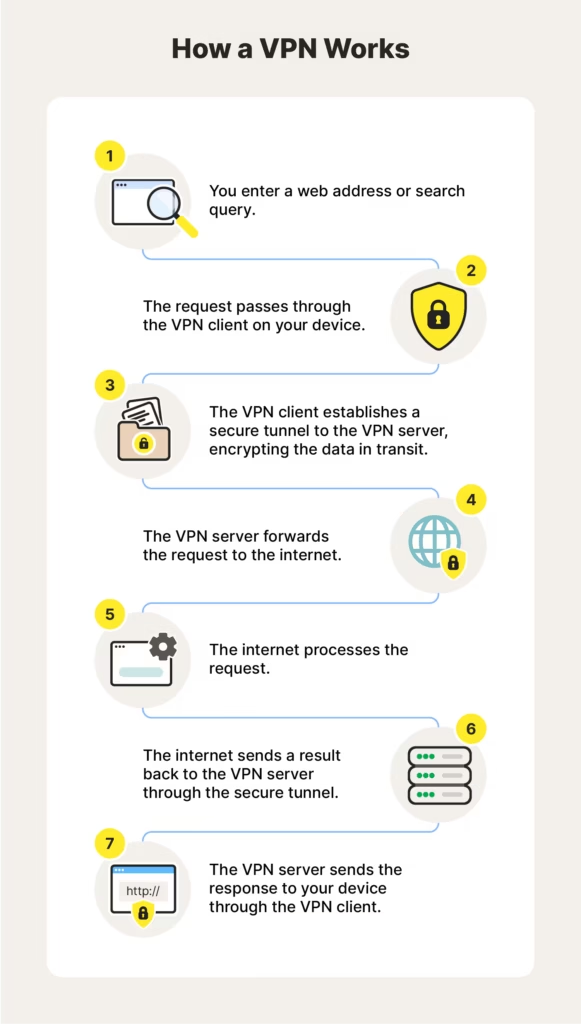
A VPN is the most popular and secure method to hide your IP address. By routing your internet traffic through a remote server, a VPN masks your real IP address and assigns you a new IP address from the server’s location.
- How it works: When you connect to a VPN, your internet traffic is encrypted and routed through the VPN’s server. This means websites see the IP address of the server, not your real one.
- Benefits: VPNs offer strong encryption, fast speeds, and reliable privacy protection. They also allow you to access geo-restricted content, ensuring that your online activities are safe and private.
- Limitations: Premium VPN services often require a subscription, though there are some free VPN to hide IP address options (with reduced speed and features).
How to Use:
- Choose a reputable VPN provider (like NordVPN, ExpressVPN, or Surfshark).
- Download and install the VPN software on your device.
- Connect to a server of your choice (this will assign you a new IP address).
2. Proxy Servers
Proxy servers work by intermediating your internet traffic, masking your IP address and providing a new one. However, they are not as secure as VPNs and might expose your data to third parties.
- How it works: When you use a proxy, your data is sent to the proxy server, which then communicates with websites on your behalf. Websites see the proxy server’s IP address rather than your own.
- Benefits: Proxies are often free and easy to use for specific tasks (like browsing a single website anonymously).
- Limitations: Proxies don’t encrypt your traffic, leaving your data vulnerable to interception. They are also slower than VPNs and can have IP leaks.
How to Use:
- Choose a reliable proxy service (many free options are available).
- Set up the proxy on your browser or device’s network settings.
3. Public Wi-Fi Networks
Using public Wi-Fi is a simple way to temporarily hide your IP address by connecting through a different network. However, this method comes with significant security risks.
- How it works: When you connect to a public Wi-Fi network, the IP address associated with your device is temporarily replaced by the public network’s IP address.
- Benefits: It’s a quick and free method to hide your IP address.
- Limitations: Public Wi-Fi networks are unsecured, which means hackers can intercept your data. It’s not recommended for sensitive activities like banking or shopping.
How to Use:
- Connect to a public Wi-Fi network (e.g., at a café, library, or airport).
- Use caution and avoid sensitive transactions while connected.
4. Tor Browser
Tor (The Onion Router) is a free web browser designed to keep your IP address hidden by routing your traffic through multiple nodes.
- How it works: Tor routes your internet traffic through a series of encrypted nodes, making it very difficult to trace your IP address. This provides advanced anonymity.
- Benefits: Tor offers high anonymity and military-grade encryption. It’s perfect for individuals concerned with maximum privacy.
- Limitations: Tor is often slow, and it’s not suitable for activities like streaming or torrenting. Additionally, it’s under surveillance by various organizations, so it’s not completely untraceable.
How to Use:
- Download and install the Tor Browser from the official website.
- Start browsing anonymously without revealing your IP address.
5. Mobile Data
Using your mobile data (rather than a Wi-Fi connection) will assign you a different IP address associated with your mobile network.
- How it works: Mobile networks assign dynamic IP addresses to devices connected to them. When you use mobile data, you are assigned an IP that is different from your home network’s IP address.
- Benefits: It’s an easy and fast way to hide your home IP address.
- Limitations: While mobile data changes your IP address, it doesn’t provide the same level of privacy and encryption as VPNs or Tor.
How to Use:
- Simply disconnect from Wi-Fi and enable your mobile data on your device.
ALSO SEE: Network-on-Chip vs System-on-Chip: Everything You Need to Know
Step-by-Step Guides: How to Hide Your IP Address on Different Devices

Different devices have different methods for hiding your IP address. We’ll break down the easiest and most effective ways to protect your IP address on various devices, including Windows, Android, and iPhone.
1. How to Hide IP Address on Windows 10
If you’re using Windows 10, hiding your IP address can be done quickly by using a VPN or proxy server.
Steps:
- Download a VPN: Choose a reliable VPN service (e.g., NordVPN or ExpressVPN) and download the software.
- Install and Log In: Follow the instructions to install the VPN software and log in with your account.
- Connect to a Server: Select a server in the location you prefer. This will mask your IP address and assign you a new one from the server’s location.
- Test the Connection: Visit WhatIsMyIPAddress.com to verify that your IP address is hidden.
2. How to Hide Your IP Address on Windows 11
Hiding your IP address on Windows 11 follows a similar process, but there are a few differences in settings.
Steps:
- Install a VPN: Choose a VPN provider and install their software on your Windows 11 device.
- Open the VPN App: Launch the VPN and sign in.
- Select a Server: Connect to a server in your desired location to change your IP address.
- Verify IP Change: Test your new IP address by visiting an IP-checking site.
3. How to Hide Your IP Address on Android Phones
Hiding your IP address on Android is simple with a VPN app. Follow these steps to secure your connection.
Steps:
- Download a VPN App: Visit the Google Play Store and download a trusted VPN app (e.g., ExpressVPN or CyberGhost).
- Set Up the App: Open the app, sign in, and follow the instructions to set it up.
- Choose a Server Location: Select the server you want to connect to, which will hide your IP address.
- Verify the Change: Use an IP checker app or website to ensure your IP address has changed.
4. How to Hide Your IP Address on iPhone
On an iPhone, you can easily hide your IP address using a VPN app. Here’s how:
Steps:
- Download a VPN: Open the App Store and install a trusted VPN app (e.g., NordVPN or Surfshark).
- Install and Log In: Set up the app by logging into your account or creating a new one.
- Select a Server: Connect to a server of your choice, which will mask your IP address.
- Confirm the Change: Visit an IP checker website to ensure your IP address is hidden.
5. How to Hide Your IP Address on Your Phone for Free
If you’re looking for a free way to hide your IP address on your phone, you can still achieve this by using free VPN apps or other methods like proxy settings.
Steps:
- Download a Free VPN App: There are several free VPNs, like ProtonVPN or Windscribe, that offer limited features without a subscription.
- Connect to a VPN Server: Choose a server from the free VPN list to hide your IP address.
- Test Your IP Address: Use an IP checker to confirm the VPN is working and your IP address is hidden.
Free vs Paid: Which is Better for Hiding Your IP?
When it comes to hiding your IP address, there are free and paid options available. Both come with their pros and cons, and the best option for you will depend on your specific needs, such as privacy, security, and speed.
Free Methods: Advantages and Disadvantages
Free methods like free VPNs and proxy servers can help you hide your IP address, but they come with some notable limitations.
Advantages:
- Cost-effective: The most obvious benefit of using a free VPN to hide your IP address is that it costs nothing. If you’re just looking for a temporary or basic solution, free VPNs can get the job done.
- Easy to Set Up: Most free VPNs are straightforward to install, making them ideal for users who need a quick solution.
Disadvantages:
- Limited Features: Free VPNs often come with limited server options and may throttle speeds.
- Security Risks: Some free VPNs may not offer strong encryption or could sell your data to third parties, which defeats the purpose of hiding your IP address in the first place.
- Annoying Ads: Many free services are supported by ads, which can disrupt your browsing experience.
- Unreliable Connections: Free VPNs and proxies can be slower and less stable compared to their paid counterparts.
Popular Free VPNs:
- ProtonVPN: No-logs policy, decent security, and free servers.
- Windscribe: Offers limited free data but strong encryption.
Paid Methods: Advantages and Disadvantages
Paid options like premium VPNs offer significantly more privacy protection and performance compared to free solutions.
Advantages:
- Enhanced Security: Paid VPN services offer military-grade encryption to protect your data from hackers, ISPs, and other third parties.
- Faster Speeds: Premium VPNs generally provide faster speeds and more server locations, giving you a better overall browsing experience.
- No Ads: With paid plans, you won’t have to deal with unwanted ads interrupting your browsing.
- Better Privacy: Paid VPN providers usually have a no-logs policy, meaning they don’t track or store your online activity.
Disadvantages:
- Cost: The primary downside is that you’ll need to pay a subscription fee, which can range from $5 to $15 per month for the best services.
- Commitment: To get the most value, you often need to commit to a longer plan, like annual subscriptions.
Recommended Paid VPNs:
- ExpressVPN: Excellent security, fast speeds, and servers in over 90 countries.
- NordVPN: Strong encryption, good speeds, and reliable customer support.
- Surfshark: Unlimited devices, great performance, and strong privacy features.
Which One Should You Choose?
- If you’re just browsing casually and want to protect your IP address occasionally, a free VPN or proxy could work. However, if privacy and security are important to you, investing in a paid VPN is the better option.
- Premium VPNs offer stronger privacy protection, faster speeds, and reliable connections, making them worth the investment for frequent users.
MORE: What Is SSID Wireless Internet? Everything You Need to Know
How to Protect Your IP Address from Hackers
Your IP address is a valuable piece of information for hackers. If exposed, it can be used for a variety of malicious activities, such as launching DDoS attacks, stealing sensitive information, or monitoring your online behavior. To protect your IP address from hackers, follow these essential steps:
1. Use a VPN for Secure Encryption
A VPN is one of the best ways to protect your IP address from hackers. When you connect to a VPN, your internet traffic is encrypted, making it much harder for cybercriminals to access your data. Additionally, VPNs mask your IP address, making it appear as though you’re browsing from a different location entirely.
- Encryption: Premium VPNs use military-grade encryption, which secures your data from hackers and other malicious actors.
- Hide Your IP: VPNs replace your actual IP address with one from their own server, preventing hackers from identifying your true location.
Recommendation: Always use a VPN with a kill switch feature. The kill switch ensures that if your VPN connection drops, your IP address won’t be exposed.
2. Use a Firewall
A firewall acts as a barrier between your device and potential threats. It filters incoming and outgoing internet traffic and can block malicious connections trying to access your IP address.
- Hardware vs. Software Firewalls: If you’re using a Windows or Mac computer, make sure your software firewall is active. For added protection, you may also want to invest in a hardware firewall that provides an extra layer of security.
- Configure Settings: Adjust your firewall settings to block untrusted networks and unauthorized applications from accessing your device.
3. Keep Your Router Secure
Your router is the gateway to the internet for your devices, and its settings can impact the security of your IP address.
- Change Default Router Settings: Many routers come with default usernames and passwords that hackers can easily guess. Change these settings to a unique, complex combination.
- Enable NAT (Network Address Translation): NAT helps obscure your private IP address by translating it to a public address that is harder for attackers to trace.
- Update Router Firmware: Make sure your router’s firmware is always up-to-date to patch any vulnerabilities.
4. Avoid Public Wi-Fi Networks
While public Wi-Fi networks are convenient, they pose significant security risks. Hackers can easily intercept your data on these unsecured networks, including your IP address.
- Use a VPN on Public Wi-Fi: If you must connect to a public network, always use a VPN to protect your IP address and encrypt your data.
- Don’t Conduct Sensitive Transactions: Avoid logging into personal accounts or making purchases while connected to public Wi-Fi.
5. Monitor for IP Leaks
Even if you’re using a VPN, IP leaks can occur, exposing your real IP address. This can happen due to DNS or WebRTC leaks, which occur when certain data bypasses your VPN and is sent directly through your IP address.
- Check for IP Leaks: Use tools like WhatIsMyIPAddress.com or IPLeak.net to check if your IP address is being exposed.
- Choose VPNs with Leak Protection: Make sure your VPN offers DNS leak protection and a kill switch feature to prevent leaks.
Troubleshooting: What to Do If You’re Still Exposing Your IP Address
After you’ve taken steps to hide your IP address, it’s important to check regularly to ensure it’s working properly. Sometimes, despite your efforts, your IP address might still be exposed due to errors or leaks. Here’s how to troubleshoot and make sure your IP address remains hidden.
1. Check for IP Leaks
Even the best VPNs or proxies can experience IP leaks. This happens when your real IP address is exposed through DNS or WebRTC requests.
Steps to Check:
- Visit an IP checker tool like WhatIsMyIPAddress.com or IPLeak.net.
- Ensure the IP address displayed matches the one from your VPN or proxy server, not your real IP.
If the IP is exposed:
- Enable DNS leak protection in your VPN settings.
- Use a VPN with a kill switch to automatically disconnect you from the internet if the VPN connection drops.
2. Verify VPN Settings and Compatibility
If your IP address is still being exposed, it could be due to a configuration issue with your VPN.
Steps to Check:
- Check VPN settings: Ensure IPv6 leak protection is enabled and DNS requests are routed through the VPN’s secure DNS servers.
- Test on Different Servers: Switch to different VPN server locations and check if your IP address is still leaking.
- Check VPN App for Updates: Ensure the VPN app is up to date, as newer versions often fix vulnerabilities or leaks.
3. Clear Browser Cache and Cookies
Sometimes, even with a VPN, your browser may still store your previous IP address in cookies or cache.
Steps to Clear Cache and Cookies:
- Google Chrome: Go to Settings > Privacy and Security > Clear Browsing Data.
- Safari: Open Preferences > Privacy > Manage Website Data, and remove stored data.
- Firefox: Go to Options > Privacy & Security > Cookies and Site Data > Clear Data.
Clearing cookies and cache ensures that previously stored IP addresses are not being used by websites you visit.
4. Use a New IP Address or Network
If you’re still having trouble, consider switching to a new network or using a different IP address temporarily.
Steps to Switch IP:
- Unplug Your Modem: Disconnecting your modem for a few minutes and then reconnecting it can sometimes assign a new dynamic IP address.
- Switch to a Mobile Network: If you were using Wi-Fi, switch to mobile data to get a new IP address from your mobile provider.
- Use a Different Device: Try hiding your IP address on a different device to ensure the issue isn’t specific to your original device.
5. Check for Proxy or DNS Conflicts
If you’re using a proxy server or custom DNS settings, they may be conflicting with your VPN or causing your IP address to be exposed.
Steps to Check for Conflicts:
- Disable Proxy Settings: Go to your device’s network settings and disable any proxy configurations.
- Check DNS Settings: Ensure your DNS is set to private or secure DNS through your VPN provider.
Conclusion
In a world where online privacy is constantly at risk, taking steps to hide your IP address has never been more important. Whether it’s to avoid location tracking, protect your data from hackers, or bypass geo-restrictions, understanding how to hide your IP address empowers you to maintain control over your online experience.
By using tools like VPNs, proxy servers, or even adjusting device settings, you can easily secure your IP address and enjoy a more private, seamless internet experience. Remember, the right method depends on your needs, whether you’re looking for free options or opting for a more secure paid VPN service.
As the digital space continues to advance, staying informed and proactive about your online privacy will ensure you’re always a step ahead. Don’t wait for your IP address to be exposed. Take control today and browse the web with confidence.
Ready to Protect Your Digital Privacy and Stay Anonymous Online?
Your IP address is the key to your online identity, from tracking your location to exposing your browsing activity. Whether you want to secure your personal data, avoid unwanted ads, or access geo-restricted content, knowing how to hide your IP address is the first step toward gaining true online privacy.
If you’re tired of being tracked by websites, hackers, or even your ISP, learning to hide your IP address is essential. It doesn’t require advanced tech skills, just the right tools and knowledge to take control of your digital footprint.
Tolulope Michael has helped hundreds of individuals safeguard their online privacy and protect their IP addresses using simple, effective methods like VPNs, proxy servers, and Tor. With expert guidance, you can protect yourself from cybercriminals and reclaim your online freedom.
Book a One-on-One Privacy Protection Consultation with Tolulope Michael
If you’re unsure which method works best for hiding your IP address or need help securing your devices, a quick conversation can give you the clarity you need. Let’s ensure your digital privacy stays intact in today’s connected world.
FAQ
How do I mask my IP address without VPN?
If you don’t want to use a VPN to mask your IP address, you can use alternative methods like proxy servers, Tor, or public Wi-Fi:
Proxy Servers: These work by routing your internet traffic through an intermediary server, masking your IP address. While proxies provide some level of privacy, they don’t encrypt your traffic, making them less secure than a VPN.
Tor: Tor is a free, open-source browser that hides your IP address by routing your internet traffic through multiple relay nodes. It provides strong anonymity but can be slow and is not recommended for high-bandwidth activities like streaming.
Public Wi-Fi: Using public networks temporarily hides your IP address by routing your connection through the network’s IP address. However, this method lacks security, as public Wi-Fi can expose you to hackers.
How can I stop my IP address from being tracked?
To stop your IP address from being tracked, you need to take proactive steps to block tracking mechanisms used by websites and online services. Here’s what you can do:
Use a VPN: A VPN masks your real IP address and encrypts your internet traffic, preventing websites from tracking you.
Use a Proxy: A proxy server can hide your IP address when browsing certain websites, but it does not offer the same encryption and privacy protection as a VPN.
Disable Cookies: Many websites use cookies to track your online activity. Regularly clear your cookies or set your browser to block third-party cookies.
Enable Incognito/Private Browsing Mode: Browsing in incognito mode helps prevent websites from saving your activity to your browser’s history, but keep in mind that your IP address is still visible to websites.
Use Tor: The Tor network routes your traffic through multiple layers of encryption, ensuring high levels of anonymity.
How do I make my IP address private?
To make your IP address private, you need to use tools that mask it or make it difficult for websites and services to trace back to you. The most effective methods are:
Use a VPN: A VPN will replace your real IP address with one from its server, ensuring your IP address is private.
Use Tor: The Tor network routes your internet traffic through multiple encrypted layers, making your IP address nearly impossible to trace.
Use a Proxy Server: A proxy acts as an intermediary server that hides your real IP address, though it doesn’t provide the same level of security and privacy as a VPN.
Can websites still track me if I hide my IP?
Yes, websites can still track you even if you hide your IP address, though hiding your IP significantly reduces the amount of tracking they can do. Here’s how websites can still track you:
Cookies: Websites use cookies to store your browsing history and preferences. Even if your IP address is hidden, cookies can still track your activity across websites.
Browser Fingerprinting: Websites can track your device through a unique browser fingerprint—a combination of your browser version, screen resolution, plugins, and other settings that are difficult to mask.
Logged-In Accounts: If you’re logged into an account (like Google or Facebook), your activity can still be tracked across websites regardless of your IP address.
How to Reduce Tracking:
– Clear cookies regularly or use cookie blockers.
– Use privacy-focused browsers that block third-party tracking.
– Disable JavaScript or use extensions like Privacy Badger or uBlock Origin to prevent tracking.
